Judging my my blog stats, my post on setting up your Palm Pre to Sync only the Google “My Contacts” group via Nuevasync is pretty popular. I hope there are some people out there who have it setup and working for them.
In the comments, I’ve tried to help a couple of people who were having problems. I decided that a follow up blog entry on troubleshooting would be a worthwile endevor.
As people report new problems, I’ll try to keep this entry updated.
Basic Troubleshooting
Give it some time: After you’ve finished the setup, you’re anxious to instantly see all of your contacts sync. However, it may take a few minutes before your phone starts to download contacts. Once it does start syncing, it may take several minutes for it to complete the process … depending on how many contacts you have. So, before you assuming that the sky is falling, just wait 5-10 minutes to see what’s happening.
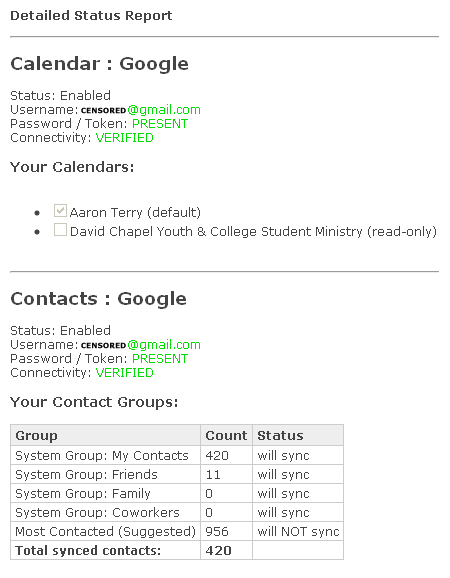
Check out the NuevaSync Detailed Status Page (screenshot below)
(https://www.nuevasync.com/PublicSite/user/detail-status.htm)
This page will show you which calendars and how many contacts are setup to sync. If the numbers look right to you, then you know that NuevaSync is successfully accessing your Google Account. If they don’t, go into the NuevaSync settings screen and double check your Google Account settings for both contacts and calendar.
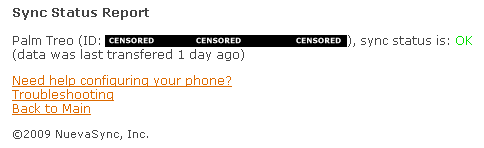
Check out the NuevaSync Sync Status Page (screenshot below)
(https://www.nuevasync.com/PublicSite/user/sync-status.htm)
This page will show you whether or not your Pre is successfully syncing. If there is no information there, then your Pre is not successfully connecting to NuevaSync. Double check the sync settings in the Pre Contacts app for the NuevaSync Exchange server account. If you see some weird error message that you can’t figure out, let me know and I’ll try to shed some light (read: guess what it means )
That’s all for now. Let me know what problems you are having and I’ll see what I can come up with.
Pingback: Palm Pre: Only Sync Google “My Contacts” | AaronTerry.com
Thanks so much for this info. It works great; I don’t think I would have used my Google contacts without your help. Thanks again.
@Eli I’m glad it was helpful. Thanks for the feedback.
Hi Aaron, and thanks for your very useful site! My problem is synching my google calendar to my palm pre. On web-based google accessed from my PC, my appointments appear at the regular time, but on my pre, the appointments all appear 4 hours earlier than they are actually scheduled, When I visit web-based google from my pre (i.e., log onto http://www.google.com instead of simply going to my calendar on the pre), the appointments there also appear four hours earlier. Any thoughts? Thanks!
@susan That is strange indeed. The first thing I would do is double check your timezone settings in both Google Calendar and on your Pre. Your Pre should be pulling the time and timezone from the Sprint Network, but if I were you I would verify.
How to check/change the timezone on a Google Calendar:
http://www.google.com/support/calendar/bin/answer…
It's very strange that web-based Google calendar shows one thing when accessed from your PC and another when you use the Pre web browser.
Let me know if you see any weird timezone stuff in your Google Calendar
I have the same problem as Susan!!!
Why do you do this through Nuevasync? Why not just create a second Google account and export your contacts into that account, then use the new account for contacts, and the old account for email/calendar?____I don't see the difference but maybe I'm missing something?
@Deep. Before I got my Pre, I was already syncing my phone contacts to GMail through NuevaSync. I know a lot of people are doing the separate Google account thing, but I don't want to manage my contacts on a separate google account.
I want access to all my contacts whether I'm using my Pre or google.com apps such Google Voice, Google Calendar, or GMail.
Since Google is now doing Push GMail through their EAS setup, I have considered eliminating NuevaSync and going that route.
I need to get my contacts from my pre to google contacts, any ideas?????
Easiest way that I’ve seen is using the patch mentioned in this article: http://www.precentral.net/how-export-and-move-your-contacts-patch
Now of course, this assumes that you know how to install patches and homebrew apps on your Pre. Here’s a write-up on how to get started: http://www.precentral.net/getting-started-preware